
Notification settings
Configure sound effects and OS notifications for incoming comments
App screen
Open the top-right menu > Settings > the "Notification" tab
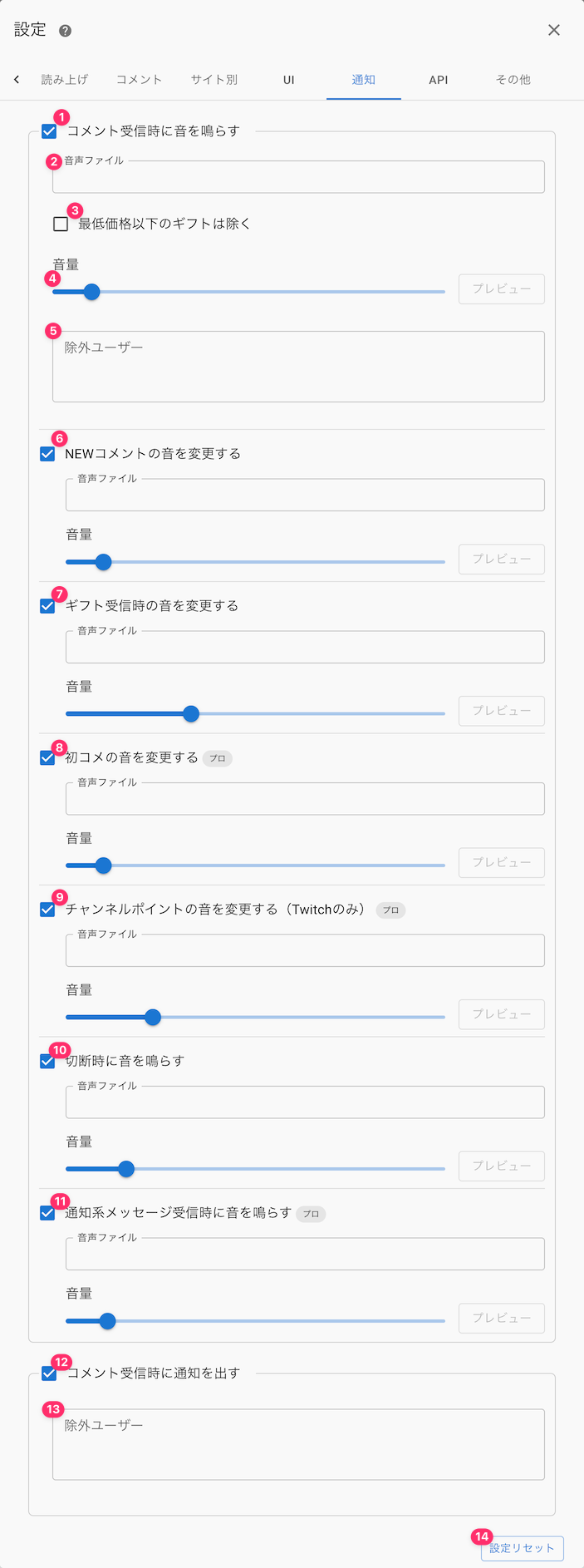 SettingsSpeechCommentsWebsite specificOthersComment ringtonePreviewExcluded usersChange New Comment soundAudio fileVolumeAudio fileSet another sound for first time comments.Audio filePreviewPreviewPreviewChange Channel Points sound (Twitch only) (ProAudio fileMakes A Sound When Cutting.Audio fileAudio fileVolumePreviewPreviewPreviewExcluded usersReset Settings
Description of each item on the app screen
| ① Play a sound when a comment is received | Plays a sound effect every time a comment is received |
| ② Audio file | Change the sound effect played when a comment is received |
| ③ Exclude gifts below the minimum price | Gifts below the minimum gift price set on each platform won't trigger a notification sound |
| ④ Volume | Adjust the volume of the sound effect played when a comment is received Use the preview button on the right to test the sound |
| ⑤ Excluded | Specify usernames that won't trigger a notification sound Using "\*" in part of a username excludes it by partial match (e.g. Nightbot-\*) |
| ⑥ Change the sound for New Comment | Plays a different sound than the usual notification sound for New Comment |
| ⑦ Change the sound for gift receipt | Plays a different sound than the usual notification sound for gift comments |
| ⑧ Change the sound for Newcomer | Plays a different sound than the usual notification sound for a Newcomer |
| ⑨ Change the sound for Channel Points | Plays a different sound than the usual notification sound when Channel Points are received |
| ⑩ Play a sound on disconnect | Plays a sound when the connection to the stream is disconnected |
| ⑪ Play a sound when a notification message is received | Plays a sound for notification-type displays such as entrances or likes |
| ⑫ Show a notification when a comment is received | Enables OS-level notifications for received commentsEnables OS-level notifications for received comments ([Note] This won't work if notifications from the app are turned off in your OS settings) |
| ⑬ Excluded | Specify usernames that won't show a notification Using "\*" in part of a username excludes it by partial match (e.g. Nightbot-\*) |
| ⑭ Reset Settings | Restores the "Notification" settings to their default values |