Comment settings
Adjust various aspects of how comments are displayed, such as usernames and icons.
App screen
Open the top-right menu > Settings > Comments tab.
Starting with 9.2, the Machine Translation settings have moved to the Translation tab → Comment translation
Description of each item on the app screen
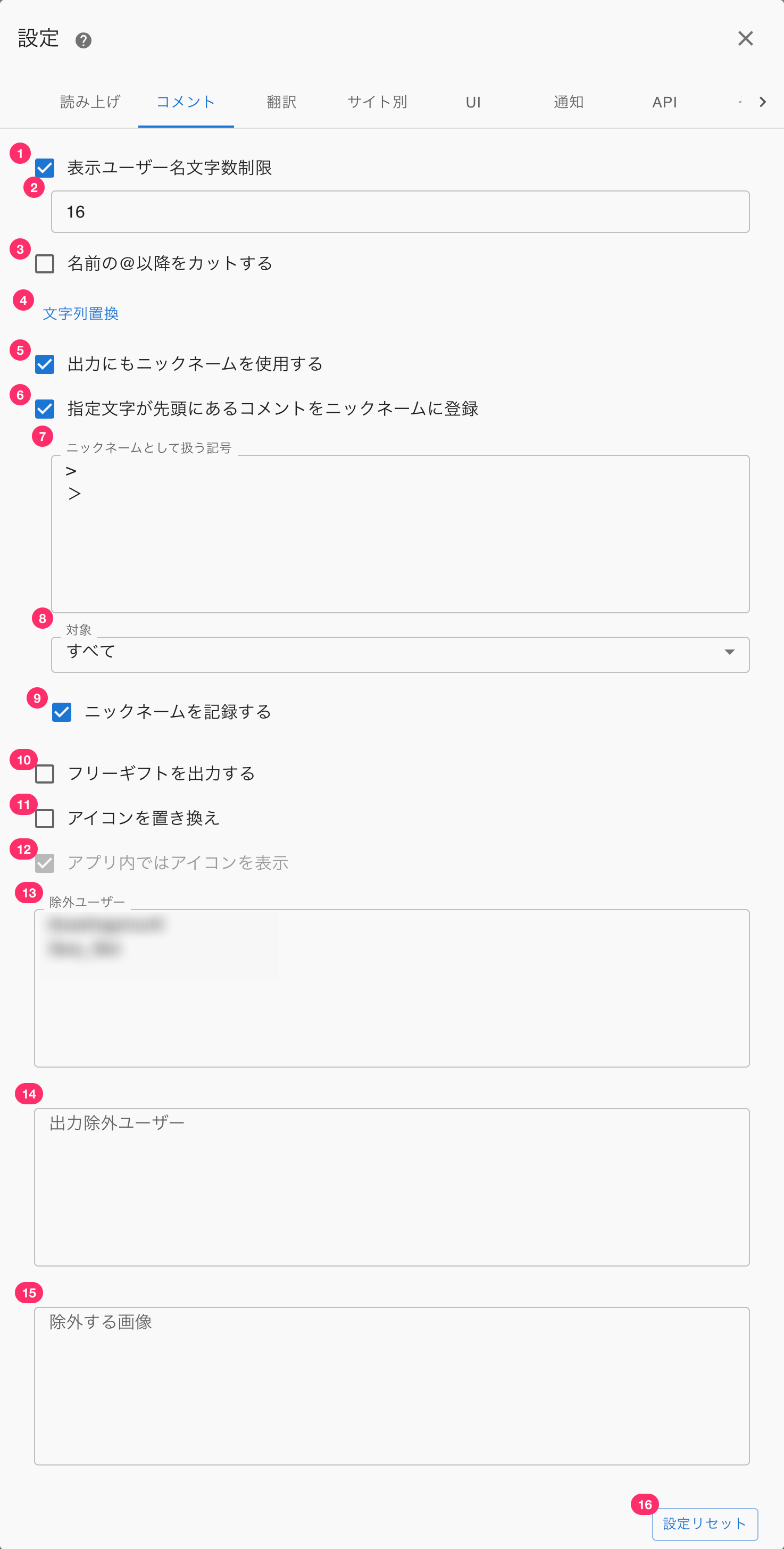 SettingsSpeechCommentsTranslateWebsite specificNotificationUsername character display limitReplacementOutput nicknamesSet a nickname from a comment with prefix.Prefix for setting nicknamesTargetAllSave nicknamesUsers not to be exportedImages to excludeReset Settings
| ① Displayed username character limit | Truncates the username (the commenter's name) shown in the app and Templates to the specified number of characters |
| ② (Input field) | Enter the value for the displayed username character limit here |
| ③ Cut off the part of the name after @ | Truncates the username (the commenter's name) from the @ onward when displayed |
| ④ String replacement | Opens the dictionary settings → Dictionary |
| ⑤ Also use Nickname in output | Applies Nickname display outside the app as well, such as in Templates |
| ⑥ Register comments starting with specified characters as Nickname | Automatically registers a Nickname when a comment begins with the specified characters |
| ⑦ Symbols treated as Nickname | Replaces the Nickname when a comment starting with the specified symbol is received |
| ⑧ Target | Limits the conditions under which viewers can register their own Nickname |
| ⑨ Save Nickname | Saves registered Nicknames to the database If not saved, they revert to the original when the stream ends ※ Anonymous users are not registered in the database |
| ⑩ Output Free gifts | Outputs Free gifts to Templates |
| ⑪ Replace icons | Automatically replaces the user's (commenter's) icon with a text icon (the first two characters of the Username are used as the icon text) |
| ⑫ Show icons in the app | Even when "Replace icons" is used, shows the original icon in the app instead of the replacement |
| ⑬ Excluded | Specify usernames (commenters' names) that are not imported as comments Using "*" in part of a username allows partial-match exclusion (e.g., Nightbot-*) |
| ⑭ Output excluded users | Enter usernames whose comments are not output to Templates You can enter one username per line |
| ⑮ Excluded images | Specify names of images that are not displayed in comments Specify one image name per line, such as YouTube Membership icons or third-party emote images (*1) |
| ⑯ Reset Settings | Restores the "Comments" settings to their default values Dictionary replacement values are kept |
※1 Image names on Twitch (the text shown when an emote is entered in the chat input field)