
Persist feature
Persist is a feature that records users who comment during your stream.
Once a user is recorded, their comment count, gift count, and other stats accumulate across multiple streams.
How to record
Turn on "Persist" within the stream.
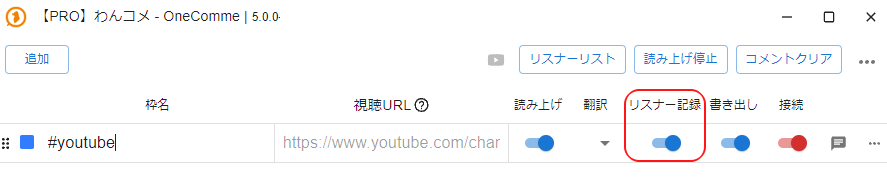 AddStream NameStream URLCommentersSpeechTranslateStop speechPersistClear commentsConnect
With this on, click "Connect" to start receiving comments, and user data will be recorded automatically.
Checking recorded data
You can check recorded user data from Commenters.
 AddStream NameCommentersStop speechClear commentsStream URLSpeechTranslatePersistExportConnect
Recorded users appear within the "Commenters" tab, in "Commenters."
Types of listener lists
There are two types of listener lists: lists per stream, and lists recorded via Persist.
Per-stream list
The per-stream list groups viewers by stream.
This list is cleared when you close OneComme.
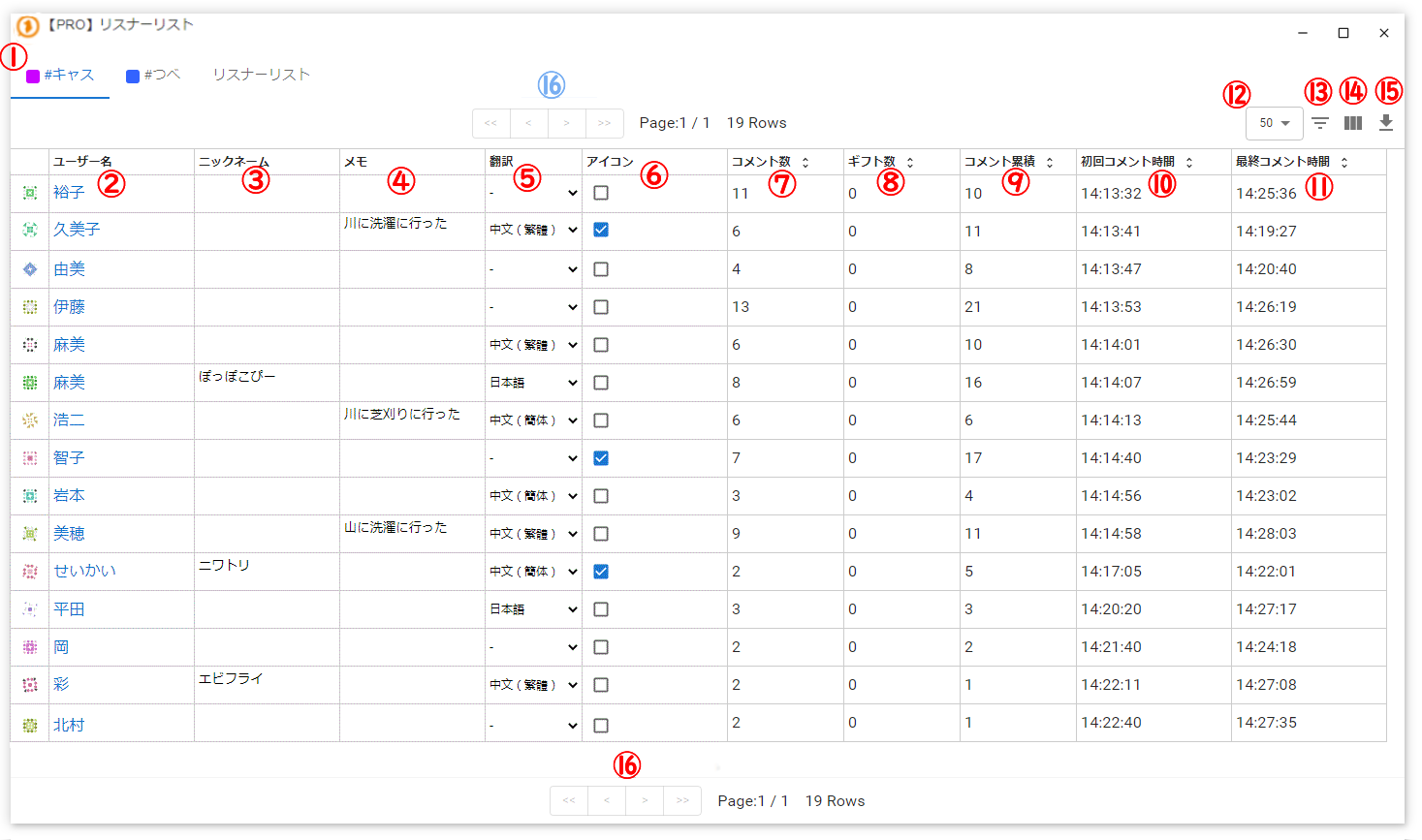 PRO] CommentersCasUsernameCorrect!CommentersNicknaNotesWent to the river to do laundryWent to the river to mow grassWent to the mountain to do laundryChickenFried ShrimpChinese (Simplified)♥mouthIconComments Count (Total)First Comment TimeLast Comment Time
| ① Stream tabs | Switch between streams |
| ② Username | Click to open a window where you can enter a nickname or note |
| ③ Nickname | You can give commenters a nickname. The nickname can be used for on-screen display as well as for Speech |
| ④ Note | You can add a note for a commenter |
| ⑤ Translation | If you have translation software integration set up, specifying a language will automatically translate this commenter's comments |
| ⑥ Icon | Whether to allow displaying the viewer's icon image (if not allowed, a solid-color circle icon with the first two characters of the viewer's name is shown instead of the image) |
| ⑦ Comments Count | The number of comments posted while connected to this stream |
| ⑧ Gifts Count | The number of gifts sent while connected to this stream |
| ⑨ Comments Count (Total) | If "Persist" is on, this shows the accumulated comment count from past streams |
| ⑩ First Comment Time | The time this viewer first commented on this stream |
| ⑪ Last Comment Time | The time this viewer last commented on this stream |
| ⑫▼ | Choose how many viewers to show per page |
| ⑬(横三本線) | Filter the listener list by conditions |
| ⑭[][][](縦三本線) | Toggle the visibility of each column |
| ⑮ ⇩ (DLマーク) | Export the listener list as CSV |
| ⑯[<<l < l > l>>] | Pagination When there are many viewers, you can switch between pages |
Recorded list
This is a list of viewers recorded via "Persist" in the stream settings.
While Persist is turned on, receiving comments will record things like the accumulated comment and gift counts.
If a viewer has existing Persist data, their first comment in that stream will be tagged with a "returning" label.
Time since last comment
When a user with existing Persist data posts their first comment (marked NEW) in their next stream, the approximate time or number of days since their last comment is displayed.
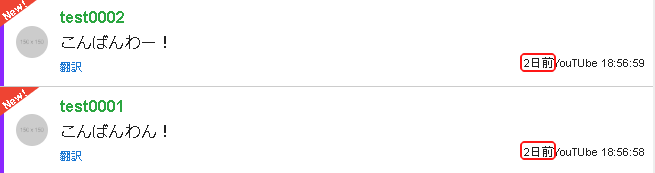 Good eveningGood evenwoof2 days ago YouTube 18:56:592 days ago /ouTube 18:56:58
- This is not shown if there is no Persist data, or if the comment is not their first since connecting (not NEW)
Deleting a viewer
Check the checkbox on the right side of the listener list for the user you want to delete.
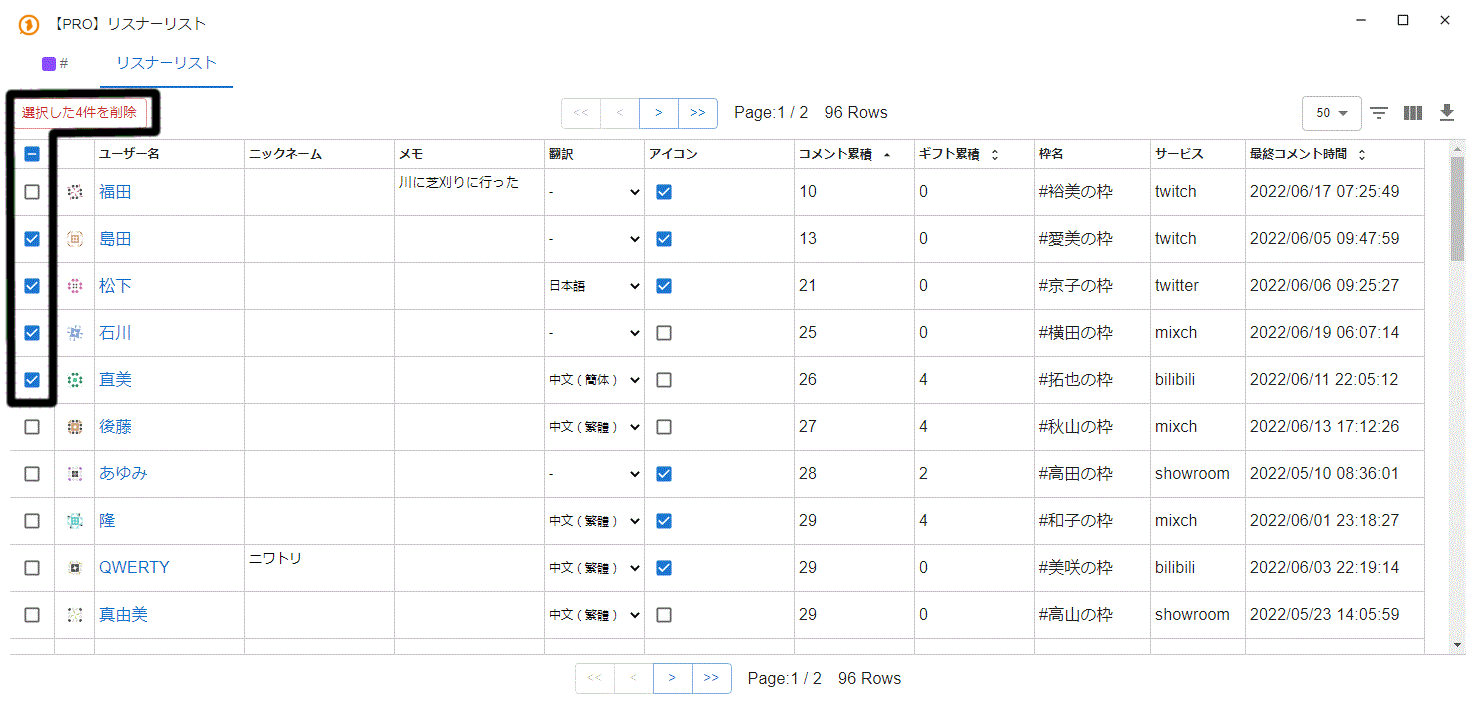 PRO] CommentersCommentersDelete 4 selectedUsernameMayumiNicknameNotesWent to the river to mow grassTranslateIconComments Count (Total)Gifts Count (Total)Stream NameHiromi's streamAimi's streamYokota's streamTakuya's streamAkiyama's streamTakada's streamKazuko's streamMisaki's streamServicesTwitchTwitchLast Comment Time
Then click the "Delete N selected" button to delete the recorded user information.
Viewer settings (when clicking a viewer's name)
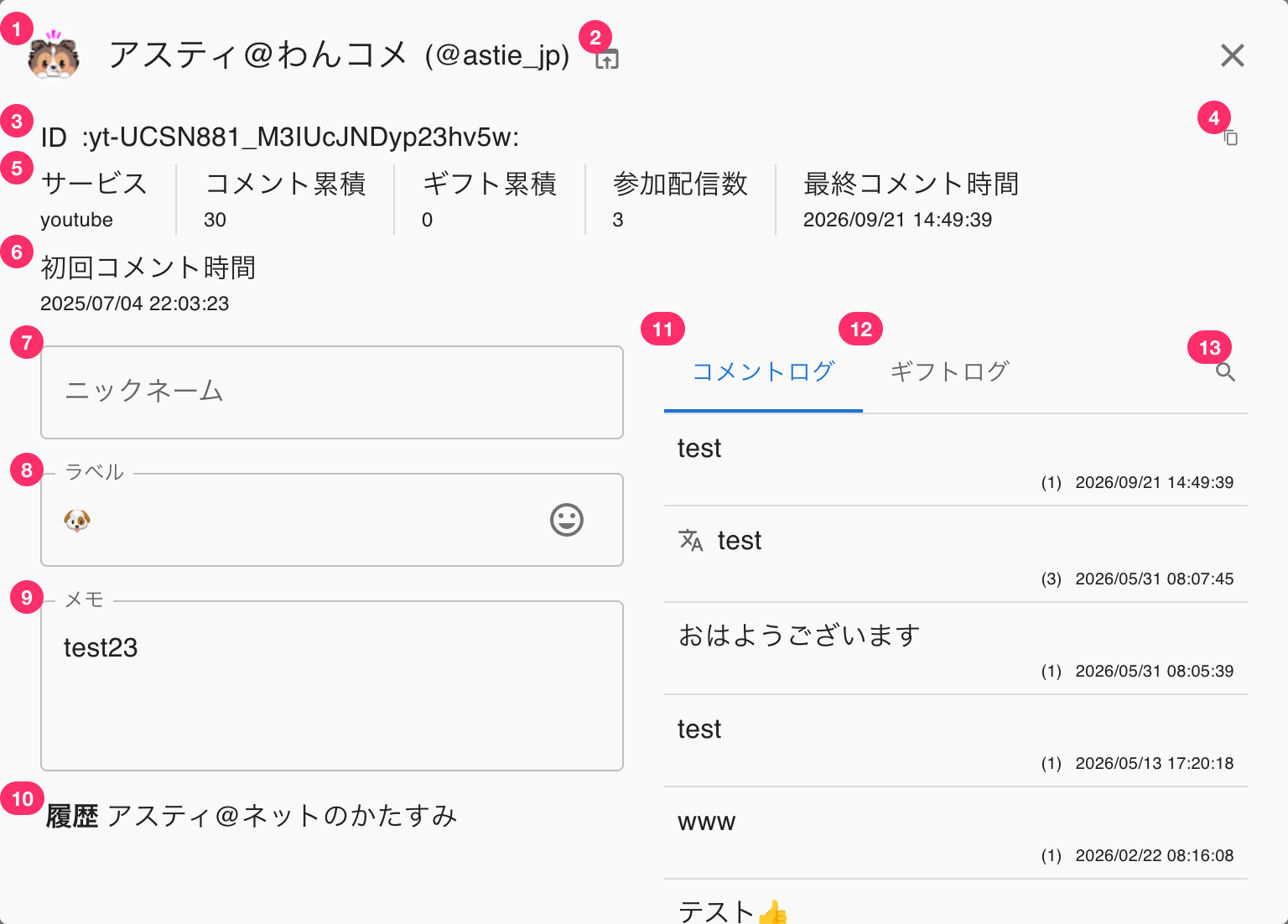 ServicesComments Count (Total)Gifts Count (Total)First Comment TimeNumber Of Participating StreamsLast Comment TimeGift LogNicknameNewcomer/RepeaterNotesComment LogGood morning
| ① Viewer name | The viewer's profile icon and name |
| ② Open page | Opens this viewer's user page on the streaming platform |
| ③ Viewer ID | A unique ID within OneComme Used when blocking or excluding from Speech |
| ④ Copy | Copies the viewer ID to the clipboard |
| ⑤ Other info | Basic information such as platform, total comments, total gifts, number of streams participated in, and last comment time |
| ⑥ First comment time | The date and time of this viewer's oldest comment among the saved Comment Log (9.2+) * Not recorded if you are not saving the Comment Log |
| ⑦ Nickname | An optional name you can give a viewer Can also be used for display and Speech |
| ⑧ Label | You can attach an optional label to a viewer |
| ⑨ Note | You can freely write notes about a viewer |
| ⑩ History | If a name change is detected, it is kept as a history |
| ⑪ Comment Log | If you are saving the Comment Log, a list of previously recorded comments is shown If there are comments currently being received in OneComme, a "Comment" tab is also shown |
| ⑫ Gift Log | If you are saving the Comment Log, a history of this viewer's paid gifts is shown (9.2+) Free gifts are not included |
| ⑬ Search | Search the Comment Log in chronological order (9.2+) |
| Translation | If translation integration is set up, you can individually configure translation settings for this viewer (only shown when translation integration is enabled) |
When you add a label, it appears before the name.
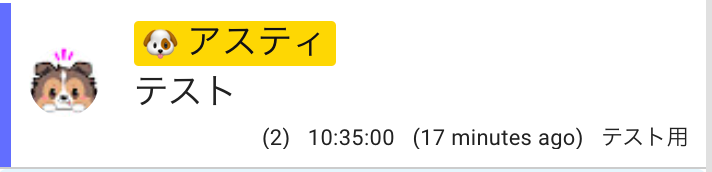 AstieTest
TIPS
Combining this with BouyomiChan's tag feature, for example, lets you apply Speech Settings individually per viewer
 CommentersDelete 0 selectedUsernameMochi DangoBlue SkyNeko ManmaSpring BreezeSnowmanKusamochiEvening PrimroseSalt CandySunbathingKotaro-maruNicknameMochiNekoKusaHinataNotesRegularTop gift sendersJapaneseIconComments Count (Total)Gifts Count (Total)Number Of Participating StreamsNumber Of Days Of Participation6 Work stream11 Game stream4 Game streamServicesTwitchTwitchTwitchLast Comment Time
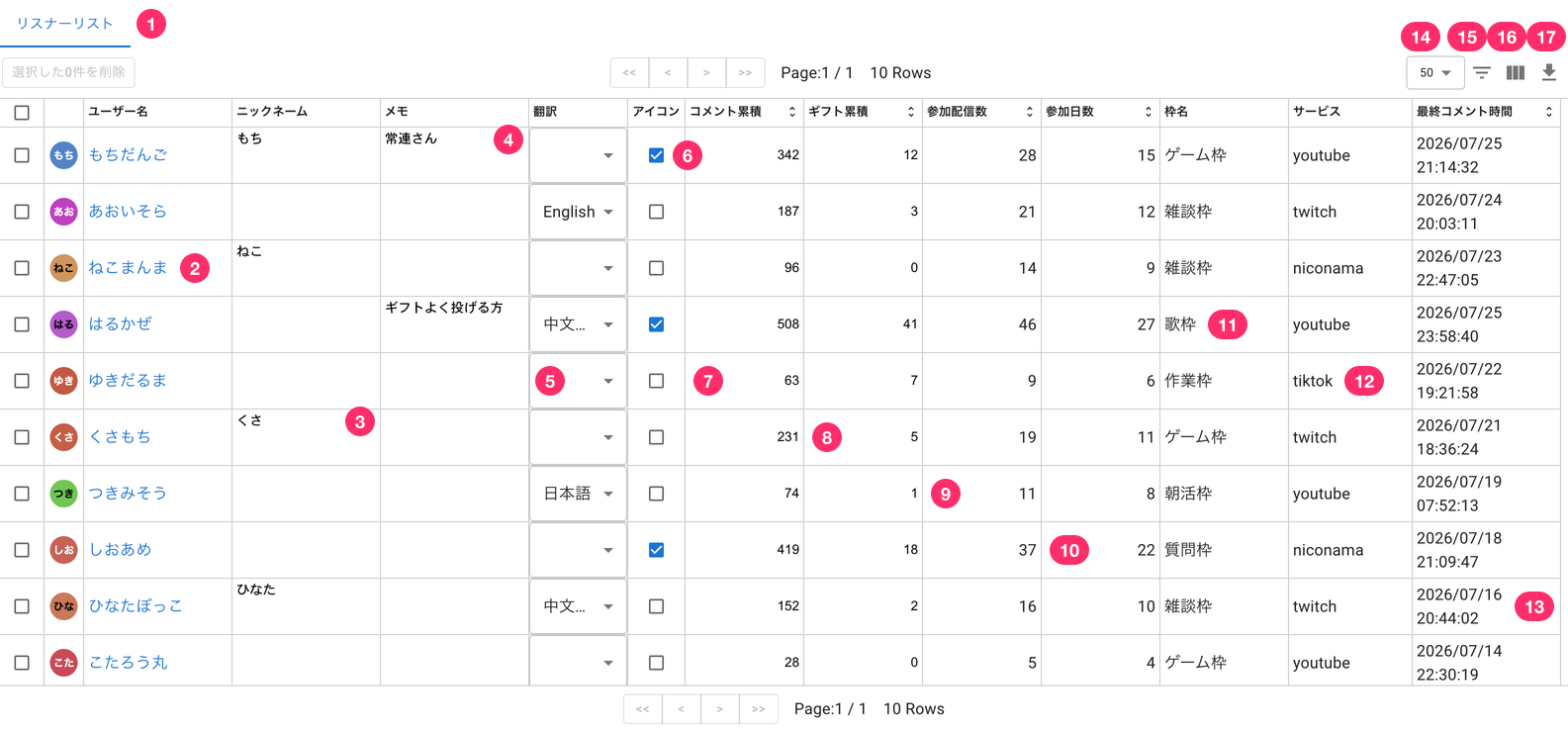
Accumulated list
| ① Commenters tab | Commenters tab |
| ② Username | The user's name. Checking the box on the left lets you delete the selected user's information. Clicking it opens a window where you can enter a nickname or note |
| ③ Nickname | You can give commenters a nickname. The nickname can be used for on-screen display as well as for Speech |
| ④ Note | You can add a note for a commenter |
| ⑤ Translation | If you have translation software integration set up, specifying a language will automatically translate this commenter's comments |
| ⑥ Icon | Whether to allow displaying the viewer's icon image (if not allowed, a solid-color circle icon with the first two characters of the viewer's name is shown instead of the image) |
| ⑦ Comments Count (Total) | The total number of comments posted across all streams you've connected to |
| ⑧ Gifts Count (Total) | The total number of gifts sent across all streams you've connected to |
| ⑨ Streams joined | The total number of streams you've participated in so far (counted each time the stream changes) |
| ⑩ Days participated | The total number of days you've participated in streams so far (counted on the first comment after the date changes) |
| ⑪ Stream name | The name of the stream when they last commented |
| ⑫ Service | The name of the platform they are commenting on |
| ⑬ Last Comment Time | The date and time this user last commented |
| ⑭▼ | Choose how many viewers to show per page |
| ⑮(横三本線) | Filter the listener list by conditions |
| ⑯[][][](縦三本線) | Toggle the visibility of each column |
| ⑰⇩(DLマーク) | Export the listener list as CSV |