
About this page
This page describes the update information for OneComme version 9.0.0, which is currently in development.
Since it is still in development, the content is subject to change without notice. Thank you for your understanding.
⚠️ Important changes
Account integration will be required for YouTube / Twitch / NicoNicoLive
If integration is not completed, chat from the above sites can no longer be retrieved.
Integration steps
- Click the login status to the left of Commenters
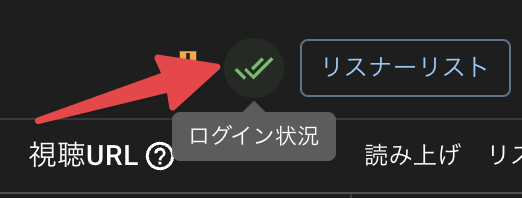
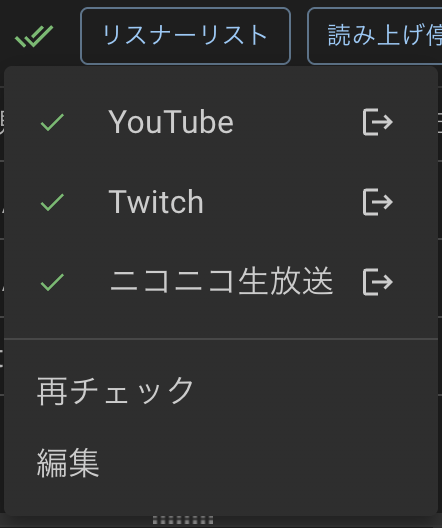
- If the site you want to log in to isn’t in the list, press edit and add it to the list of sites to log in to
- Click the site name in the login status list
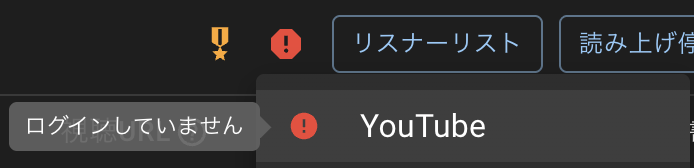
- Log in
- Press recheck, and once everything is checked, you’re done
Connections that fail to reach the chat for a certain period of time while connected will now be stopped automatically
- If a connection cannot reach the chat panel for a certain period of time while connected, it will be stopped automatically → e.g. when there is no next stream, or a stream never starts
- A loading indicator is now shown while the connection process is running
A limit on simultaneous connections to the same site will be added
- The following limits will apply to simultaneous connections to the same site
- Free version: up to 2
- PRO: up to 4
This is the expected minimum for now, and may change based on usage research and other factors.
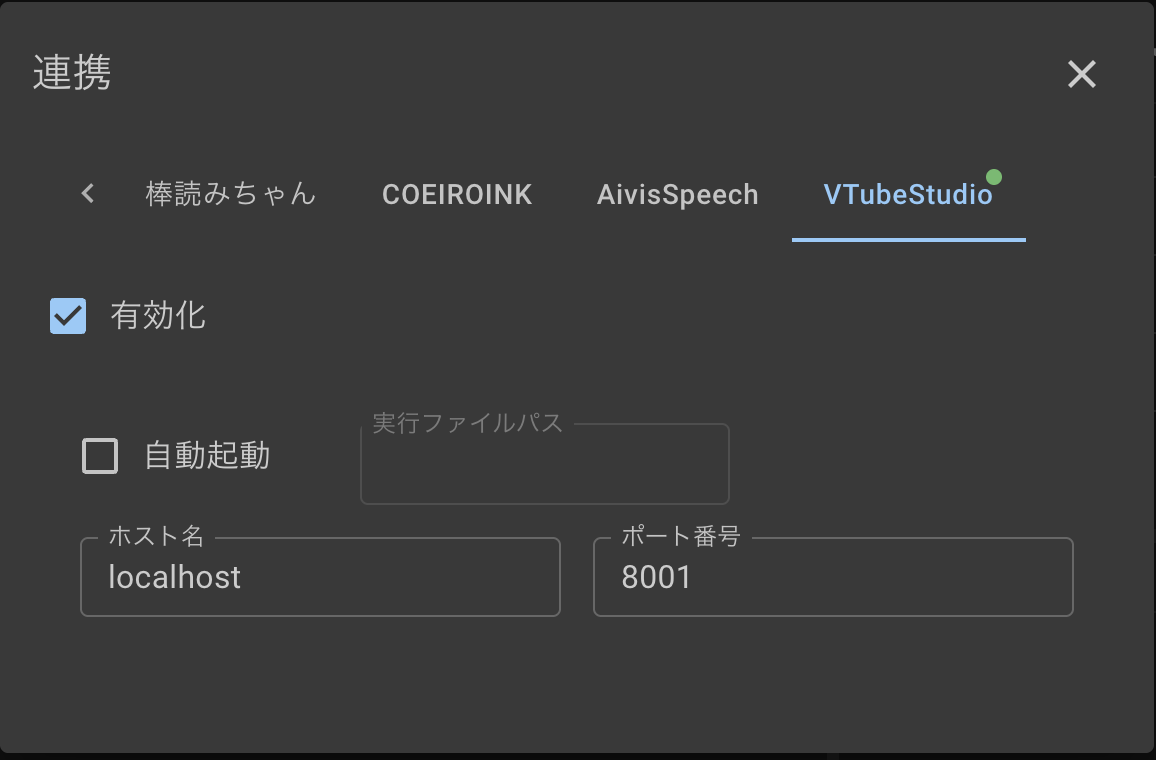
VTS (VTubeStudio) integration settings
- Added VTubeStudio integration
- Integration must be enabled to use it with WordParty
- VTS settings on the WordParty template side are scheduled to be removed
- The number of integration checks has been greatly reduced
Request to collect usage data
- To help with server load and future feature research, we will collect the following information:
- Number of comments
- Name of the platform comments are retrieved from
- Whether PRO is active
- A randomly generated ID for tracking usage
Thank you for your cooperation in helping stabilize the service.
Accordingly, the privacy policy has also been updated.
You can opt out from Settings > Other.
Deprecations and spec changes
-
YouTube: Removed the “Show all chats” option
→ Only “All chats” will remain -
YouTube: Only the streamer’s own account can connect to members-only streams via a channel URL
-
YouTube: Redesigned (and made more granular) the Membership Gift settings
→ The old settings have been removed in favor of finer-grained options

When a membership gift is sent, it will now be grouped together like this:
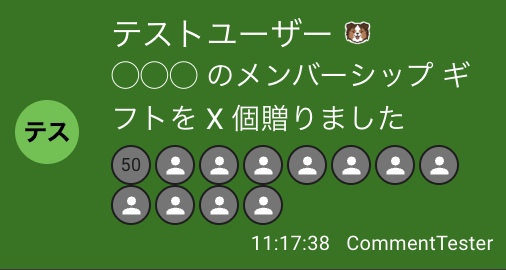
- Twitch: Subscription messages and similar text will now be translated to match your language
→ If your WordParty trigger conditions specify English text, you will need to update your settings
{{username}} subscribed with {{plan}} (Tier {{tier}})
{{username}} subscribed with {{plan}} (Tier {{tier}}, {{months}} months total, {{streak}} month streak)
{{username}} gifted a Tier {{tier}} sub to {{receiver}}
{{username}} gifted {{value}} Tier {{tier}} subs! {{total}} total gifted!
{{name}} has watched {{value}} consecutive streams, setting a new streak record.
{{name}} raided with {{value}} viewers!- Removed VTS integration / fixed objects from the WordParty editor
→ Added a new, more flexible “Fixed Wall” feature instead
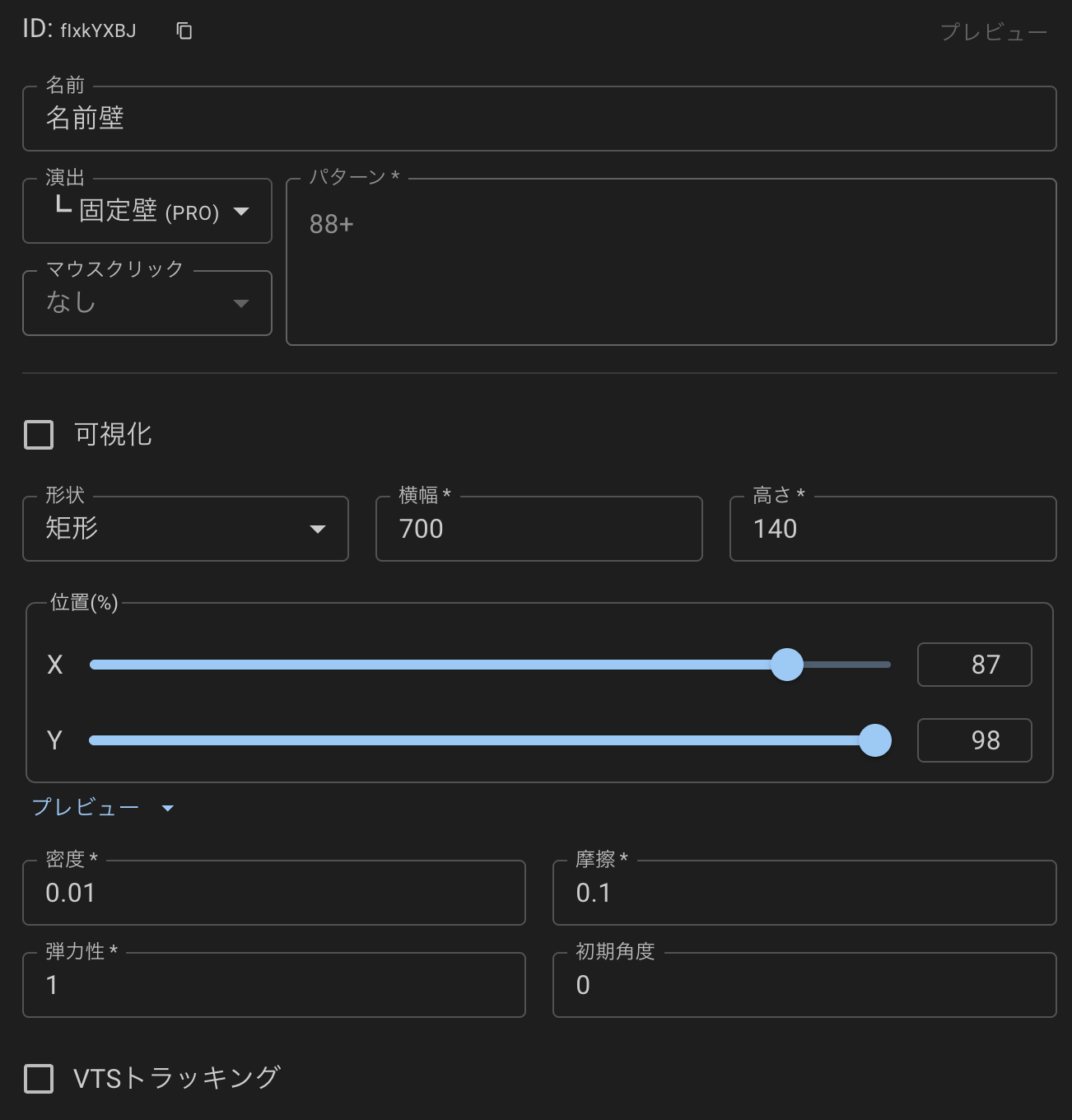
WordParty
- Added a fixed wall item for Drop (PRO)
- Added a visualization setting (stream display) for fixed walls / drop items
- When turned on, the collision area becomes visible
- Folders can now be created in the editor
- Items can be disabled per folder
- Fixed an issue where trigger effects fired in WordParty even when disabled
- Added ”*” support for the currency symbol on gift comments in the WordParty editor (matches on the numeric value regardless of currency)
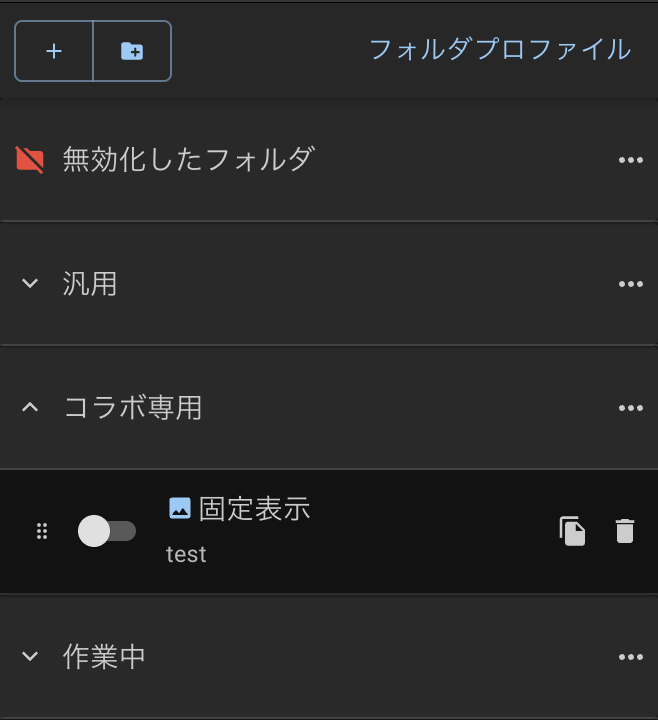
- Folder profile feature (PRO)
- Lets you switch a saved set of enabled/disabled states all at once
- Using the custom CSS output from folder options, you can switch which items are enabled/disabled per scene from a single template
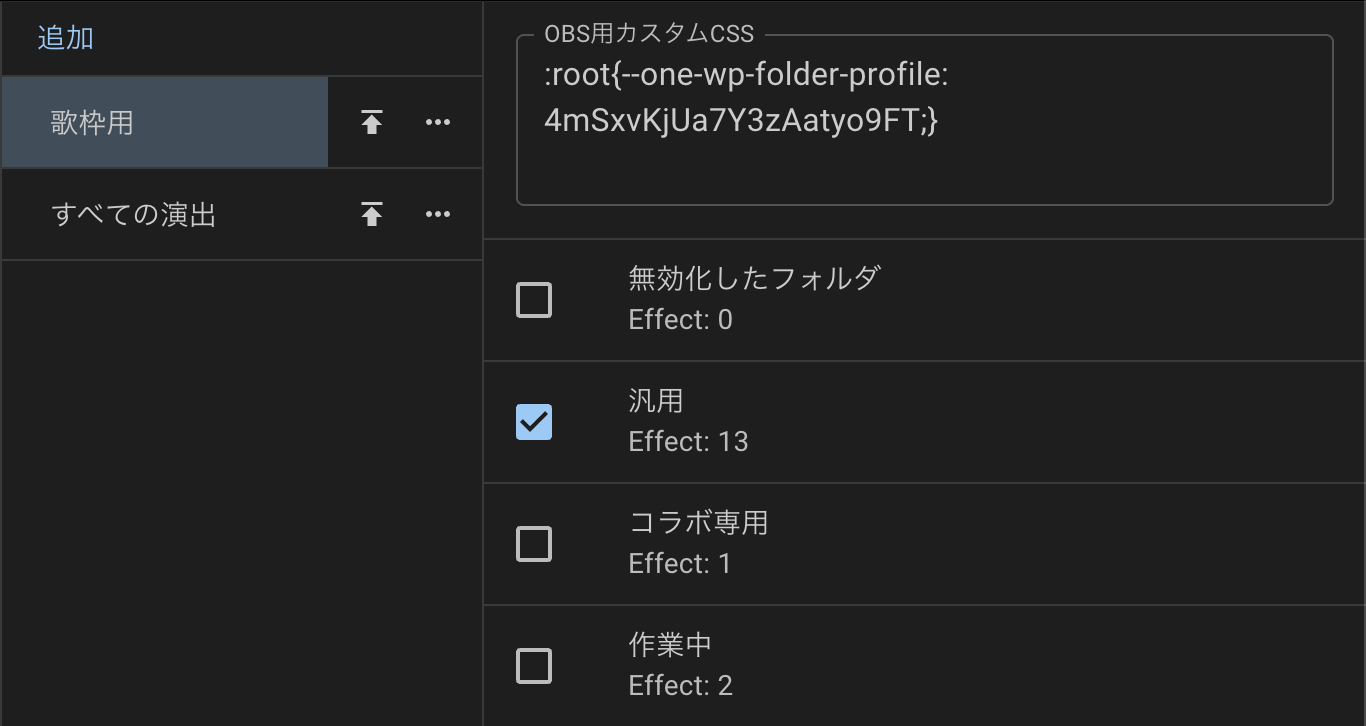
When applying a different custom CSS, add a new template to OBS each time (note that duplicating it in OBS will result in all copies sharing the same custom CSS).
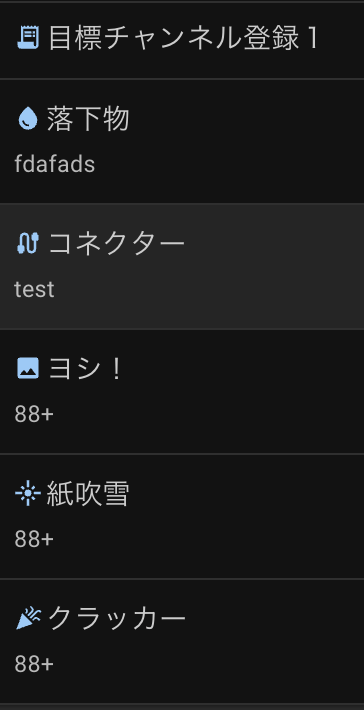
- Added an “effect type” icon to the item list
- Fixed a malfunction caused by the OS’s animation reduction setting
- Fixed flickering in drop item effect images
- Reduced processing load during VTS integration
Website specific
[NEW] Fuwacchi
- Added support for retrieving comments from “Fuwacchi”
- Supports both stream page and user profile page URLs
- Login is not supported at this time
YouTube
- Reduced memory usage and improved performance on connection
- Scaled up OneComme’s servers
- Added a “handle name → name” replacement setting (introduces a slight delay)
- You can now select the default channel account after authentication
- Now retrieves the view count (for reference only)
- Color-coded member gift and milestone chats
- Improved membership gift display
- Added a setting to choose whether to automatically connect to the next stream (default: on)
- Added a setting to prevent connecting to streams scheduled more than 30 days out (default: off)
- Strengthened cache limits
- Fixed a counting bug when poll responses exceeded 1000
- Adjusted the processing order for polls and deleted comments
- Added cumulative vote count to the parameters returned for polls
- Added support for Super Chats in Korean won
- Top-comment icons now also appear on Super Chats
- User-posted comments are now shown as such even when chat translation is applied
- If a translation is available, you can also view the translated content via the translation icon
NicoNicoLive
- Reduced memory usage and improved performance on connection
- Fixed a display glitch in the chat window
- Added dark theme support to the chat window
- Added comment retrieval for members-only streams with a passphrase set
- If already authenticated with the streamer’s account, you can connect as-is
- Now shows an error message for unsupported streams
Comments from official broadcasts cannot be retrieved.
Twitch
- Reduced memory usage and improved performance on connection
- Color-coded subscriptions / gift subs
- Added a background color to Bits gifts
- Added multi-language support for subscription messages
- Added support for join notifications
- Added support for raid notifications
- Added support for follow notifications
- Added an on/off toggle for notification handling under Settings > Website specific > Twitch
- Changed the display of received subscription gifts to match YouTube’s format
- Added support for individual (non-bundled) subscription gifts on Twitch, which were previously unsupported
TwitCasting
- Set the anonymous flag to true for c:info,twitcastinguest comments
TikTok
- Added automatic cache & cookie clearing before connecting
- Addressed connection issues caused by stricter security measures
- The stream page is now shown in a separate window when connected via TikTok
API/SDK
- yt.survey.start now returns information for an already-started poll on “connected” when permission is requested
- yt.survey data now includes total, ratio, and individual vote counts
- Stopped exposing type definitions that are only used internally
- Made comment search/retrieval related public APIs private
- Added an API for sending system messages:
[POST] /api/comments/system - Type definitions can now be referenced at
http://localhost:11180/static/sdk/ - Republished
@onecomme.com/onesdkto npm
Plugins
- [BREAKING] Log files from plugins are now split out into plugin.log
- [BREAKING] Disabled logging for plugin API requests, since plugins with templates were sending a large volume of requests with no interval even while disabled
UI
- Adjusted the scroll behavior of the main comment display
- Adjusted the comment scroll animation behavior
- Improved comment scroll stopping behavior
- Scroll animation now continues even after the comment display limit is reached
- Moved the bookmark button in between comments
- The PiP window header now stays a fixed size when resizing the PiP window
- Fixed an issue where quitting OneComme while the PiP window was displayed caused it to appear small the next time
- Moved translation to the far right in the comment action order
- Slightly adjusted the streamer background color
- Animated the “Like” count in streaming information
- Added an option in UI settings to hide the Viewers, Total Viewers, and other streaming information columns
- Added keyboard shortcuts for comment actions
alt+b - Bookmark
alt+d - Delete comment
alt+g - Look up with Google Translate
alt+c - Copy comment to clipboard
alt+s - Stock comment (PRO only)
alt+m - Mute commenter (exclude from speech)
alt+o - Open commenter page in browser
alt+p - Pin
alt+q - Block commenter
alt+w - Register as a participant (only when viewer-participating system is on)
Dictionary
- Added the
uflag to the supported regular expression flags
Experimental features
- Automatic comment translation using Chrome (PRO)
- Added Streamlabs integration (YouTube channel subscriptions / donations)
- Create a Streamlabs account and log in
- On Streamlabs, link the channel you want to track subscriptions for
- On the “API Tokens” page at https://streamlabs.com/dashboard#/settings/api-settings, note down “Your Socket API Token”
- In OneComme, open “Integration > Streamlabs” and enable it
- Paste the token you noted in step 3 into the Socket API Token field and register it
- Adjust the settings below it as needed
Streamlabs channel subscription notifications are only available if the subscribing user has “Publish subscribed channels” enabled.
Viewer-participating System
- Fixed an issue where an empty display was output to the template when everyone was participating
Remote View
- Strengthened sleep prevention measures
- Now provides the same fixes as the app’s main display
- Addressed an issue where connecting from a tablet sometimes failed
- Added one extra step during connection (to make connecting easier)
Timestamps
- Fixed an issue where the timestamp for
T 00:00:00comments was not recorded - Fixed time discrepancies caused by daylight saving time and overseas time zones
Other settings
- Added a setting under Settings > UI to automatically open the chat window on connection
- Added a setting under Settings > UI to choose the notification display duration / size
- Added disconnect and notification sound effects under Settings > Notice
PiP
- Reactions and emote effects are no longer shown while in PiP or minimized
- Added a drag area only along the outer edge of the pipWindow, making it easier to resize
Templates
- Fixed an issue where nicknames were not displayed in the World / cyber-mx templates
Comment log analysis
- Reworked search to make it easier to search across dates
- Removed the old multi-condition UI and time-based filtering
- Graph-based period extraction can now be adjusted continuously
- Graph-based period extraction can now also be done via the calendar
- The graph display can now be collapsed
Other improvements
- Made the database and authentication files less prone to corruption
- The database now automatically recovers when corrupted
- Added a license status icon to the header
- Added an icon for sites that require login
- The “please log in” icon is now hidden for sites you’re already logged in to
- No longer need to restart the app after updating your License Key
- Unified the currency display in Dummy Commenter to formats like JPY
- The login name is now shown when hovering over the login status
- Fixed an issue where the nickname settings icon didn’t appear for users without a recorded nickname
- Improved the browser window UI
- Back / forward / home / open in web browser
- Adjusted so that Japanese characters aren’t URL-encoded when pasting a stream URL
- Added a log out button for connected sites
- Now shows a loading indicator while a connection is being processed
- Reviewed database queries and reduced the number of references
- Changed test image resources to be retrieved via the server
- Added scroll handling for the StreamDeck plugin
- Made the storage method for licenses / auth keys even more secure
- Updated internal engine / browser
- Replaced the application certificate
- Added Korean language support