
App won't start after an update / screen shows nothing
If the app won't start right after an install or update, security software may have blocked the update process.
Note
There are multiple reports of this happening particularly with McAfee, which blocks writes to the config file and prevents the app from starting.
If the app is already unable to start, do the following.
On Windows
- Right-click the Windows button on the taskbar and click "Run"
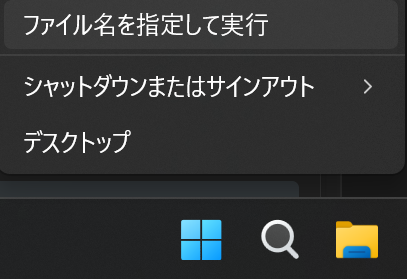 RunShut down or sign outDesktop
- In the window that opens, enter the following path in the name field and click OK
%APPDATA%\onecomme
- Open the config(.json) file in the folder that opens with a text editor or Notepad
- Find the line that looks like
"migrations":\{"version":"version number"\}(usually near the end)

- Rewrite it to the version number from before the update (e.g. 5.2.1 or 5.2.0), and save it (if this is your first install, use 0.0.1)
- Close the file and start OneComme
If this still doesn't fix it, see "If it still won't start" below.
On Mac
- Press
cmd+shift+Gto open the Finder "Go to Folder" window - Enter the following in the location field and click Go
~/Library/Application Support/onecomme/
- Open the config(.json) file in the folder that opens with a text editor or Notepad
- Find the line that looks like
"migrations":\{"version":"version number"\}(usually near the end)

- Rewrite it to the version number from before the update (e.g. 5.2.1 or 5.2.0), and save it (if this is your first install, use 0.0.1)
- Close the file and start OneComme
If this still doesn't fix it, see "If it still won't start" below.
If it still won't start
There may be a different cause triggering an error at startup.
In the folder that contained the config file, there is a "logs" folder, and inside it a file called main.log.
Copy this file somewhere else to keep it, then post it to the forum along with a description of the situation.