
Dictionary
Dictionary settings for speech and comment replacement.
Speech dictionary
The speech dictionary converts text before it is read aloud.
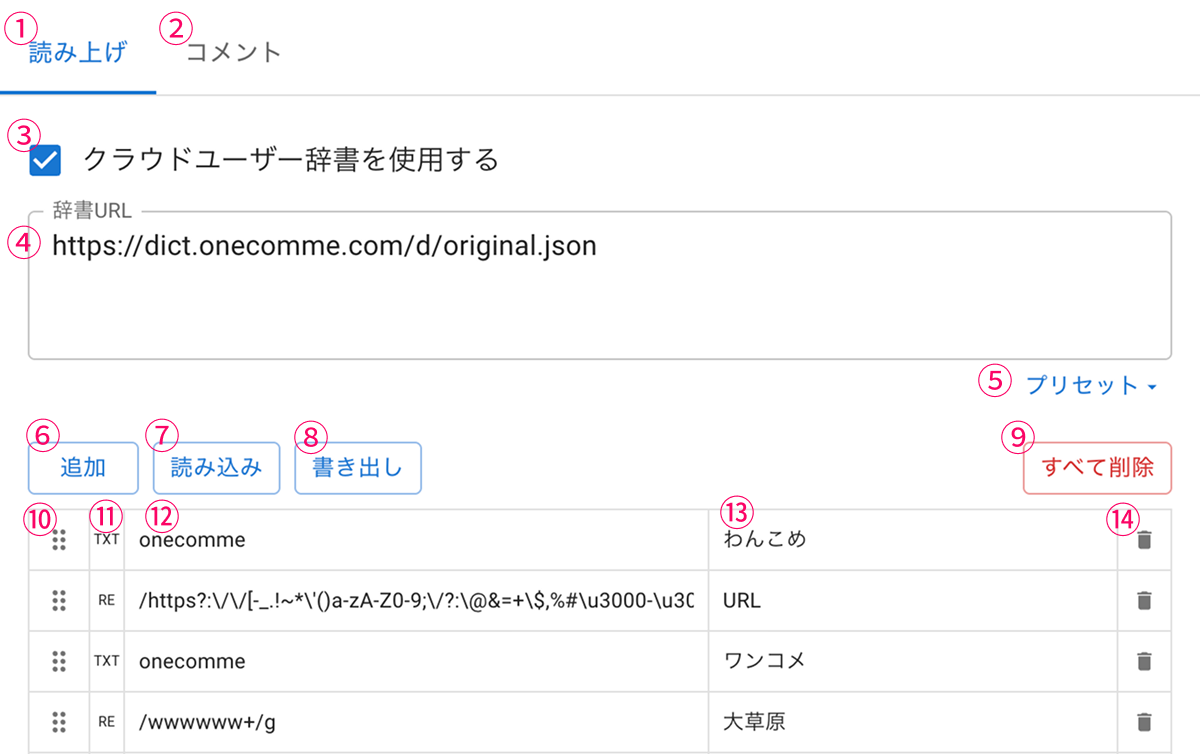 SpeechCommentsUse Cloud User DictionaryDictionary UrlAddImportExportOneCommeOneCommeLOLPresetClear stock
| ①Speech tab | Shows the speech dictionary settings |
| ②Comments tab | Shows the comment conversion dictionary settings |
| ③Use cloud user dictionary | Check this to reference dictionary data uploaded online |
| ④Dictionary URL | Enter one dictionary file URL per line |
| ⑤Preset | Add dictionaries from those provided by OneComme ※ The Japanese-English dictionary has a large number of words, so watch out for the load it can cause |
| ⑥Add | Adds a new row to the dictionary |
| ⑦Import | Imports the dictionary output with ⑧ and adds it to the dictionary (does not overwrite) |
| ⑧Export | Outputs the currently entered dictionary data as a file |
| ⑨Clear all | Deletes all dictionary data |
| ⑩Drag bar | Reorders the priority of the dictionary entries Entries higher up are converted first |
| ⑪Conversion type | Shows "RE" if the conversion target entered in ⑫ is a regular expression, or "TXT" if it is a plain string |
| ⑫Conversion target | Enter the text you want to convert Enclosing it with // on both sides treats it as a regular expression |
| ⑬Conversion result | Describes how to convert matching text When using a regular expression, you can use group references such as $1, $2 in the replacement |
| ⑭Delete | Deletes this row |
Comment conversion dictionary
This dictionary converts text found in comments or viewer names.
If no conversion result is specified, the text is replaced with the same number of * characters.
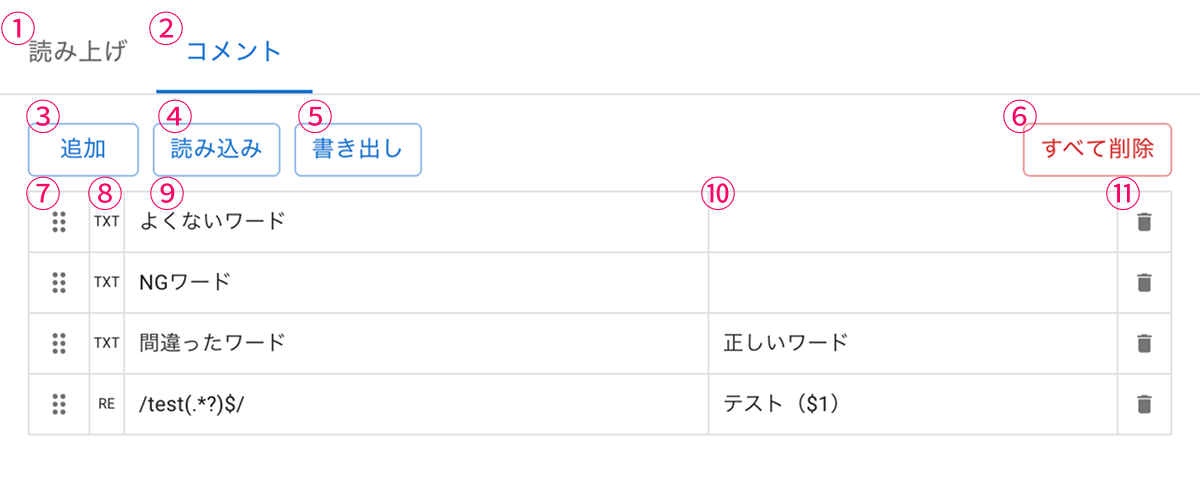 SpeechCommentsAddImportBad WordNG WordExportCorrect WordClear stock
| ①Speech tab | Shows the speech dictionary settings |
| ②Comments tab | Shows the comment conversion dictionary settings |
| ③Add | Adds a new row to the dictionary |
| ④Import | Imports the dictionary output with ⑧ and adds it to the dictionary (does not overwrite) |
| ⑤Export | Outputs the currently entered dictionary data as a file |
| ⑥Clear all | Deletes all dictionary data |
| ⑦Drag bar | Reorders the priority of the dictionary entries Entries higher up are converted first |
| ⑧Conversion type | Shows "RE" if the conversion target entered in ⑨ is a regular expression, or "TXT" if it is a plain string |
| ⑨Conversion target | Enter the text you want to convert Enclosing it with // on both sides treats it as a regular expression |
| ⑩Conversion result | Describes how to convert matching text When using a regular expression, you can use group references such as $1, $2 in the replacement |
| ⑪Delete | Deletes this row |